Comb Communications
  • HOME
  • CORPORATE
    • ABOUT US
    • CAREERS
    • VIDEOS
      • COMB SYSTEM OVERVIEW
      • CORPORATE OVERVIEW VIDEO 1
      • CORPORATE OVERVIEW VIDEO 2
    • DATA PROTECTION POLICY
  • PRODUCTS
    • COMB PORTAL
    • MYCOMB MOBILE APP
    • LICENSE FEES
      • CONTRACTS
      • CONTRACT CANCELLATION PROCESS
    • COMB HARDWARE
      • MK II INTERCOMS
      • MK II NS INTERCOM
      • TAP-TAP KEYPAD
      • BT LOADER (REMOTE READER)
      • COMB SWITCH
      • COMB SCAN
    • WAVE READER
  • SUPPORT
    • FAQ
    • TECHNICAL SUPPORT
    • TECHNICAL DOWNLOADS
    • MARKETING DOWNLOADS
    • LIGHTNING PROTECTION
  • DISTRIBUTORS
  • NEWS
    • COMB
      • UPGRADING MK II NS
      • 2G/3G NETWORK CUT-OFF
      • VODACOM PACKAGE PRICE INCREASE: APRIL 2024
    • GLOBAL
      • TOWERS CRIPPLED BY LOAD SHEDDING
      • COMPONENT SHORTAGES
  • CONTACT
  • SELF HELP
  • SIGN IN >
    • COMB PORTAL LOGIN
    • B1000 LOGIN

Comb Portal Features

Portal Features

The Heartbeat of Access and Control

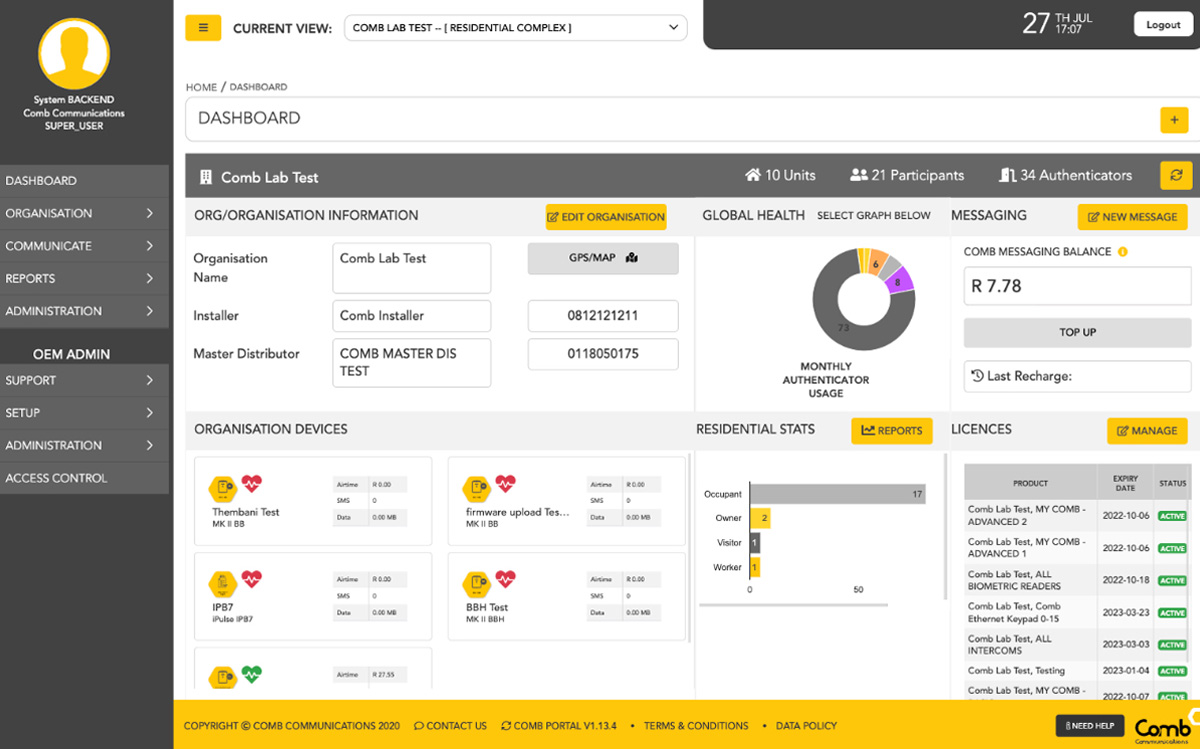
Comb Portal is a comprehensive web-based management platform that integrates with our bespoke hardware and software. Along with a range of 3rd party products, all tailored to suit any managed access control ecosystem. Undeniably, Comb Portal is the class-leading Facilities Management System, with features like secure login, informative dashboards and the ability to customise and schedule updates. The intuitive navigation allows a user to drill down on various queries, related to specific hardware and, with our exception-based reporting, a user can quickly generate reports, invite new users and partners and, update Organisation or user information with ease.

Now with Comb Portal users have access to a range of additional functionality

SECURE LOGIN

Login with encrypted username and password and safely update user details and reset a password online.

CUSTOMISABLE DASHBOARD

Add/Remove widgets on the home page as per user requirement. Pin the most used functions to dashboard and drag and drop functionality on the dashboard.

3RD PARTY INTEGRATION

Integration with various 3rd parties, e.g. Biometric Readers (Ipulse, IDEMIA, SUPREMA); Vehicle scanners (Comb Scan) and Remote encoders (Nova or BT Loader).

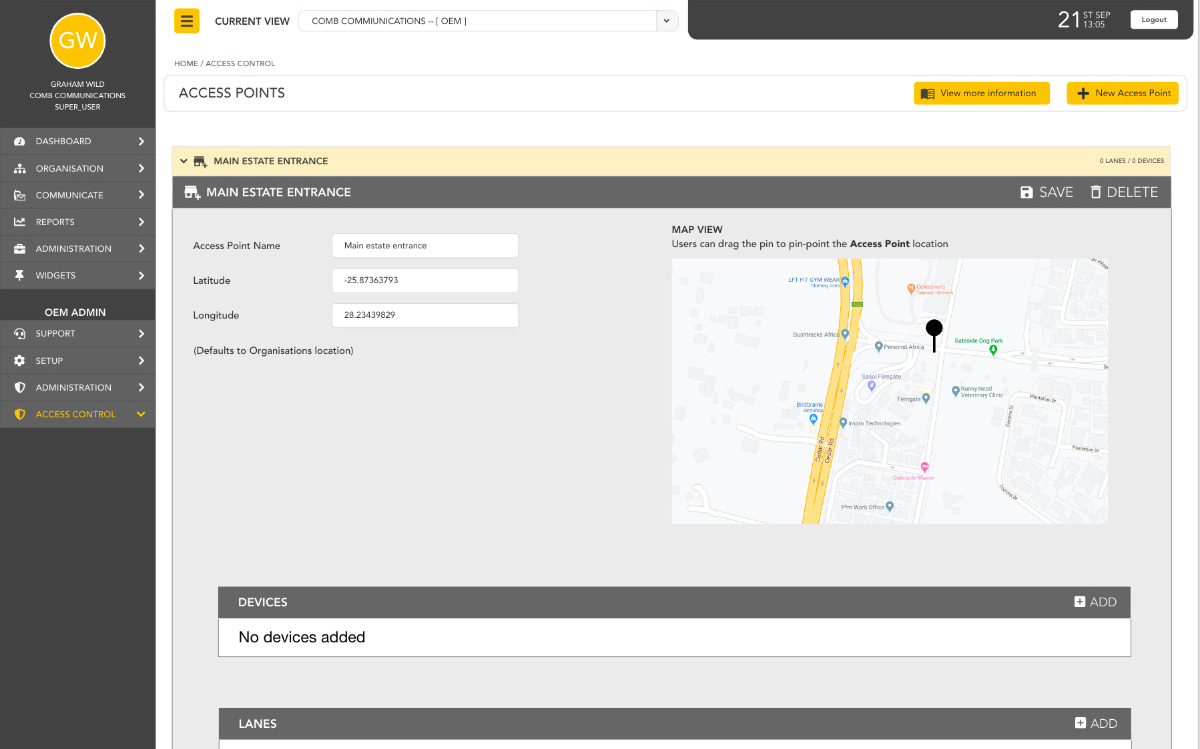
ACCESS MANAGEMENT
The management of all hardware, infrastructure and integrated devices related to access within your organization.
null

Devices

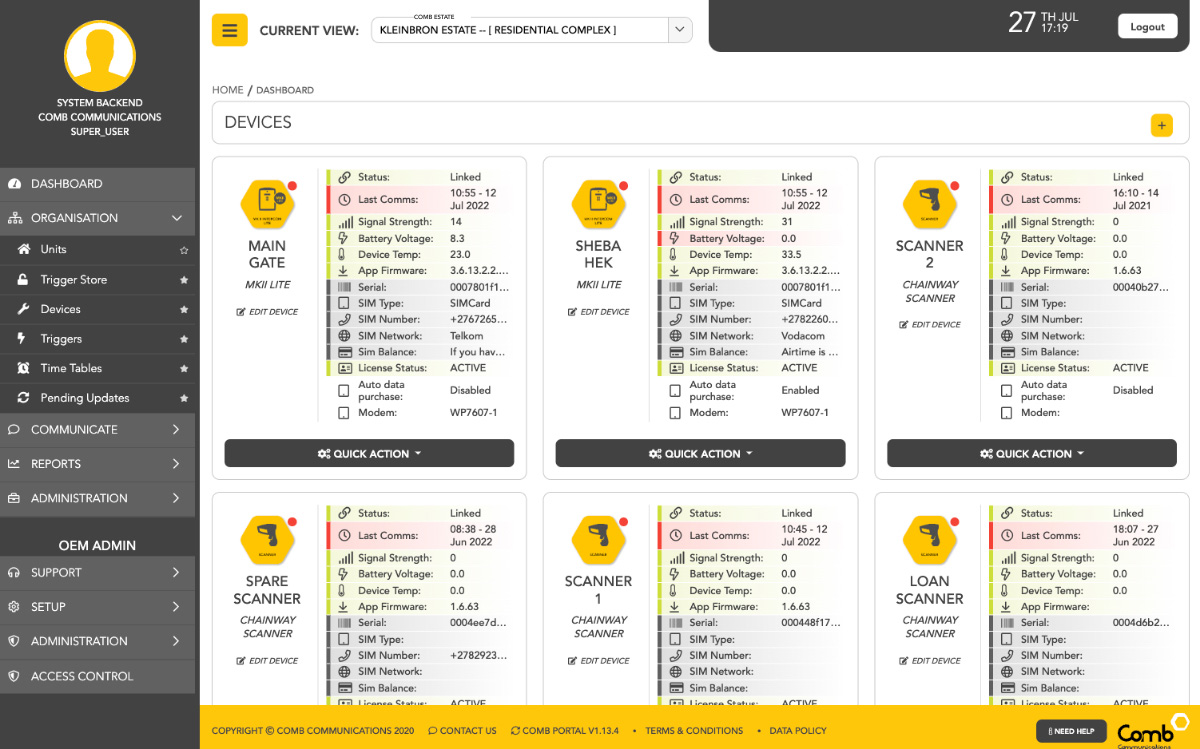
  • View real-time health status of devices linked to an Organisation
  • View real-time synced data and updates on all connected devices to an Organisation
null

Manage Hardware

  • Set-up default relay configuration & intercom display.
  • View balances for Intercom SIM-card
null

Device Pending Updates

  • Any changes made to the organisation’s data and requires synchronisation with a field device/hardware.
  • View pending updates for all linked devices, e.g. Intercoms, Vehicle scanners and keypads
  • Schedule over-the-air Firmware updates for devices
null

Manage Access Devices

  • Capture and store triggering devices and methods for allocation at a later stage, e.g. Remotes, RFID.
  • Link and unlink triggering devices from occupants, e.g. Remotes, RFID
null

Trigger Store

  • Set up triggers for DTMF, PINs, TAP TAP from the Trigger Store.
null

Time Tables

  • Allocate specific times for access.
  • Assign and allocate time restrictions to Occupants, e.g. Domestics, Garden service etc.
  • Allow or deny access according to custom time and dates.

ORGANISATION DETAILS
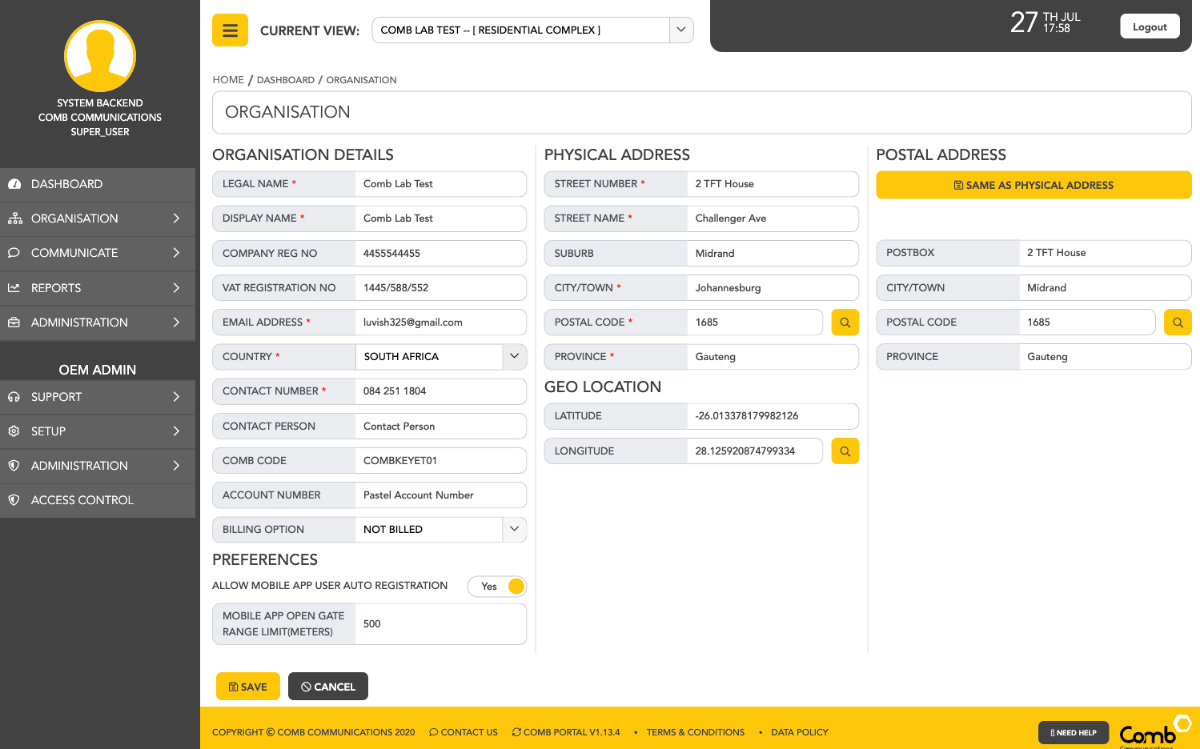
Edit or update details pertaining to the organisation/complex and the people involved.

null

User Maintenance

  • Create, update or remove a user
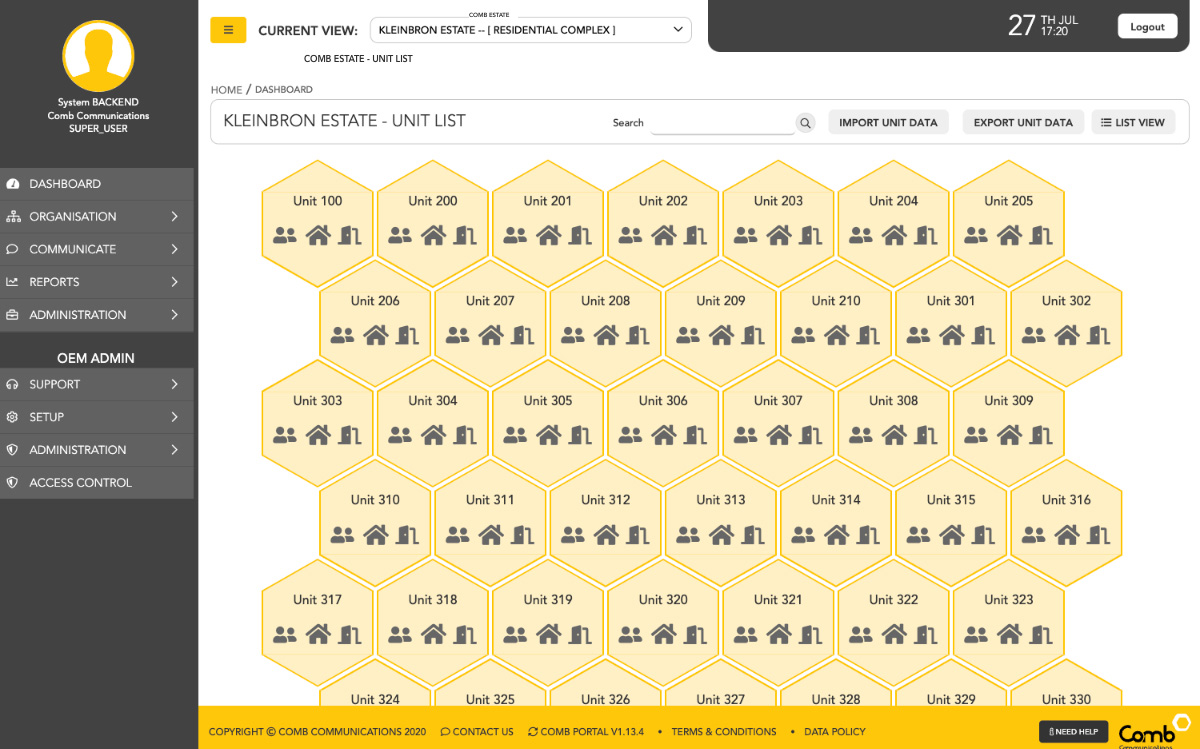
  • Add or remove Occupants from residential units in an Organisation
  • Specify the different roles of Occupants in residential units, e.g. Owners, Tenants, Workers, Visitors and other Contacts
  • Schedule date and time to activate or deactivate access control of Occupants, e.g. Tenants moving in or out
  • Increase/decrease the number of residential units in an Organisation
null

Partners

  • Details of partners that provide a service to the complex
  • Add/remove Partners from an Organisations, e.g. installers and managing agents
null

Invite

  • Provide access to the system as part of the organisation, i.e. inviting a new tenant/occupant in the complex.
null

Pending Invitations

  • Create invitation for registration on the system.
null

Comb Store

  • Acquire or renew licenses, purchase Comb Cash or activate new hardware.
  • View and manage all product/licenses online
  • Purchase additional products/licenses online
  • View available balance and request to load additional credit

REPORTS
A central point to pull reports on an array of specific requirements, including your billings, hardware usage and more.
null

Visitor Access Report

  • A report displaying access type per owner/occupant/domestic per unit, for the period selected.
null

Billing Summary

  • A report displaying total cost per unit for calls made, for the period selected. User input for monthly cost.
null

Billing Detail

  • A report displaying total cost per owner/occupant per unit for calls made, for the period selected. User input for monthly cost.

COMMUNICATE
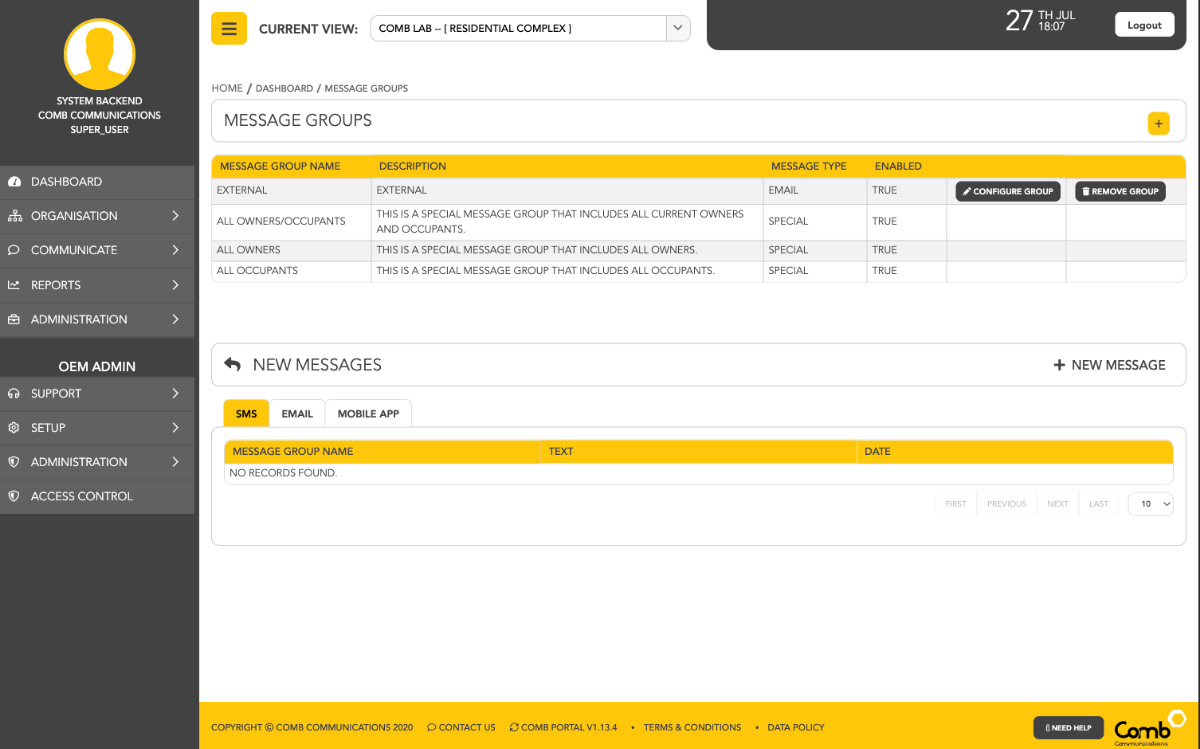
A dedicated facility for outbound communication to persons involved with your organisation/complex.

null

Bulk Messaging (Email or SMS)

  • A single application for communicating via SMS, e-mail or mobile notifications to your audience or individuals
  • Bulk email and SMS sent from Portal
  • Create custom groups for sending specific communication
  • The Comb
    Environment

Find an Installer

Our approved installers are trained and accredited to ensure success with every installation.

Find a Distributor

Our approved installers are trained and accredited to ensure success with every installation.

Need Advice

If you can’t find a solution online, reach out to one of our consultants for professional advice.

Copyright © 2026 Comb Communications.

Taste WordPress Theme by ThemeTaste

[ Placeholder content for popup link ] WordPress Download Manager - Best Download Management Plugin

Plan B-ONE

MK II NS

MK II Plus

MK II Lite

MK II BBH

MK II BB

G2

B1000

HOME

Products

CORPORATE

About Us
Careers

PRODUCTS

Annual License Fees
Comb Portal
MK II Family
Tap-Tap
BT-Loader
Comb Scan

SUPPORT

FAQ
Technical Support
Technical Downloads
Marketing Downloads

DISTRIBUTORS

Distributors
Become a Distributor

CONTACT

Sales Enquiry
General Enquiries
Technical Enquiries
Become a Distributor

Contact us on:
011 089 5800 /
011 089 5825


NSBC Member
Copyright © 2018 Comb Communications Pty Ltd   Privacy Policy   Terms & Conditions   Contact Us   Data Protection Policy

Comb Communications
  • HOME
  • CORPORATE
    • ABOUT US
    • CAREERS
    • VIDEOS
      • COMB SYSTEM OVERVIEW
      • CORPORATE OVERVIEW VIDEO 1
      • CORPORATE OVERVIEW VIDEO 2
    • DATA PROTECTION POLICY
  • PRODUCTS
    • COMB PORTAL
    • MYCOMB MOBILE APP
    • LICENSE FEES
      • CONTRACTS
      • CONTRACT CANCELLATION PROCESS
    • COMB HARDWARE
      • MK II INTERCOMS
      • MK II NS INTERCOM
      • TAP-TAP KEYPAD
      • BT LOADER (REMOTE READER)
      • COMB SWITCH
      • COMB SCAN
    • WAVE READER
  • SUPPORT
    • FAQ
    • TECHNICAL SUPPORT
    • TECHNICAL DOWNLOADS
    • MARKETING DOWNLOADS
    • LIGHTNING PROTECTION
  • DISTRIBUTORS
  • NEWS
    • COMB
      • UPGRADING MK II NS
      • 2G/3G NETWORK CUT-OFF
      • VODACOM PACKAGE PRICE INCREASE: APRIL 2024
    • GLOBAL
      • TOWERS CRIPPLED BY LOAD SHEDDING
      • COMPONENT SHORTAGES
  • CONTACT
  • SELF HELP
  • SIGN IN >
    • COMB PORTAL LOGIN
    • B1000 LOGIN